


If you manage Webflow sites, the pricing update published on 13 May 2026 affects your plans, limits and billing choices. Two mid-tier site plans are becoming one, a new Team tier is launching, and every workspace is getting AI credits. Check the details before deciding whether to switch to annual billing before the deadline.
Here's what changed, what it costs and what we recommend.
What changed
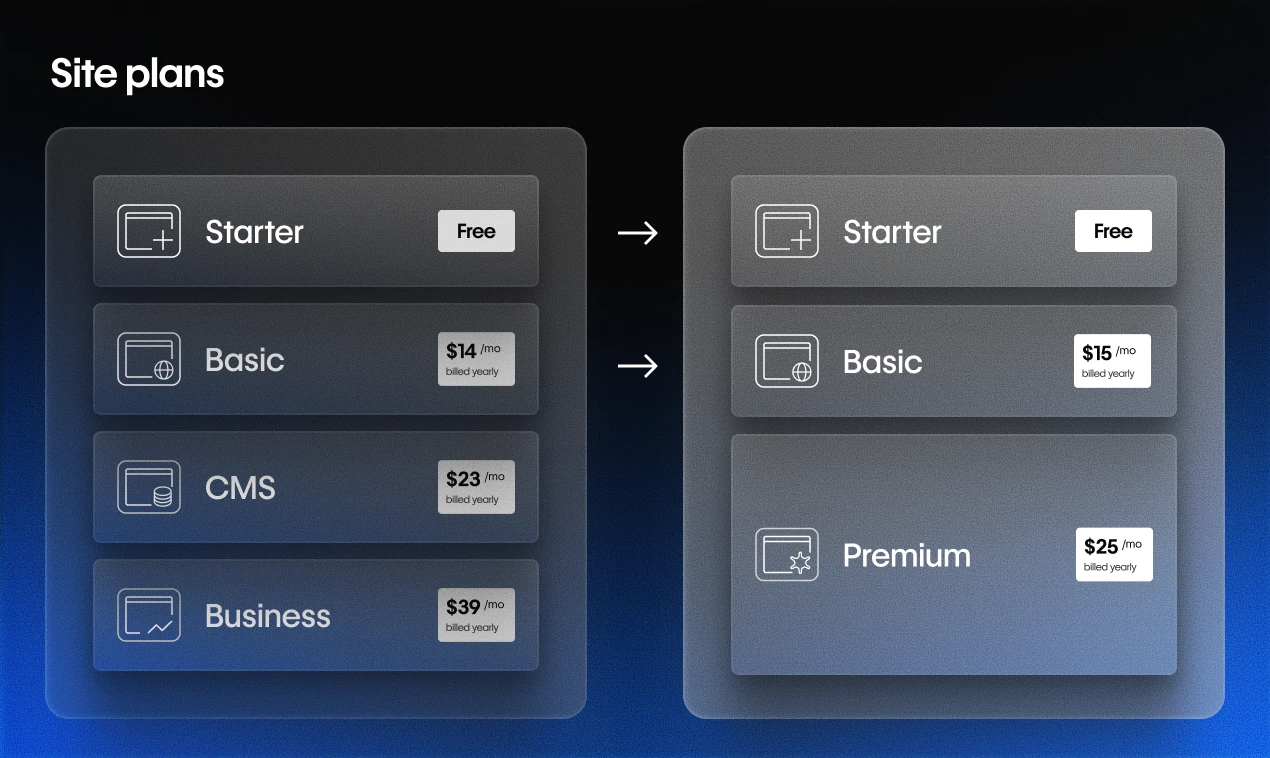
CMS and Business plans become Premium
The CMS ($23/mo) and Business ($39/mo) site plans are becoming a single Premium plan. On an annual contract, it costs $25/mo. Monthly, it's $39.
Webflow has a pricing calculator at webflow.com/pricing/calculator to help you work out your exact change. It's worth running your active sites through it before the deadline.
Basic plan gets a small increase
The Basic plan moves from $14 to $15/mo on annual billing ($23 to $25 on monthly). Static page limit doubles from 150 to 300 pages, which is a useful improvement for simple marketing sites.
A new Team plan for growing teams
The Team plan sits between self-serve and Enterprise. It's aimed at growing teams that have outgrown their current setup but aren't ready for a full Enterprise contract.
It includes one site with 100 CMS collections, 10 workspace seats, Localization, and a bundle of features that were previously Enterprise-only: AEO agents, page branching, single-page publishing, site activity log, custom SSL certificates, and security headers.
It's available on annual contract only. You'll need to contact Webflow's sales team to get it.
AI credits in every Workspace
Webflow is introducing credits for all its AI features, including the site builder, alt text generation and AI code components. Every workspace plan includes a baseline allowance. Credits reset monthly on self-serve plans and annually on Team and Enterprise plans.
When the changes apply
The timing depends on your workspace type:
Most existing sites: changes take effect at your next renewal on or after 29 June 2026. You can lock in your current plan by switching to annual billing before that date.
Freelancer and agency workspaces: you have until 16 November 2026. Webflow has given agencies more time because they often manage sites for clients who need to review the change.
New site plan purchases: the new pricing applies from today.
What we recommend for clients
We manage Webflow sites for clients on different plans. Here's how we'd approach each situation.
On the CMS plan: a small price increase and higher limits
The price moves from $23 to $25/mo. The old 2,000 CMS item limit and the need for add-ons also go. If you've reached the CMS limit or paid for add-ons, this gives you more for the price. You don't need to take action: your site will move to the new plan automatically.
On the Business plan: check your bandwidth
If you're using anywhere near 100GB of monthly bandwidth (high-traffic sites, lots of video or large assets), the drop to 50GB matters. Check your Webflow analytics dashboard to see your typical bandwidth usage before the deadline. If you're under 50GB most months, no issue. If not, bandwidth add-ons will be available.
It's crazy how expensive and slow Webflow has become. I don't see a place for it anymore. If you're non-technical, use Squarespace. If you are even a little bit technical, you can build a static website with agents.
Yury Molodtsov · @y_molodtsov · May 16, 2026
Should you lock in annual billing now?
Site owners can switch to yearly billing before the changes take effect to lock in their current Site plan for another year.
If your site is currently on monthly billing, switching to annual before 29 June locks in your current price for another 12 months. Whether that's worth it depends on your situation. For clients who are confident they're staying on their current plan, it's an easy saving. For clients who might upgrade or need the flexibility of monthly, it's less clear-cut.
We're reviewing this with clients case by case. If you're unsure, tell us which plan you're on and we'll look at your setup.
Does your team need the Team plan?
Most of our clients won't need it. If your growing marketing team has reached the limits of self-serve and needs multiple editors, publishing workflows or Localization, and Enterprise feels too much, the Team plan is worth discussing.
AEO agents and page branching are also included. These can help teams managing sites where content changes frequently, and they've been Enterprise-only until now.

What this means for Webflow's direction
These pricing changes also tell us where Webflow is heading.
The Webflow humiliation ritual: 1. 2nd price hike in 12 months. 2. Slash bandwidth again by 50% to 50GB. 3. Add zero meaningful value. 4. Call it "simplifying."
Ralph Pèrrier · @RalphPerrier · May 13, 2026
Combining CMS and Business into Premium makes the choice simpler for new customers. Webflow has struggled to explain the difference between the two plans, and this removes that ambiguity.
The Team plan gives companies that have outgrown self-serve an option below Enterprise. It adds features as well as seats, which makes it a more useful step between the two.
Webflow describes itself as an "agentic web marketing platform". Adding AI credits to every workspace makes those features part of the platform, rather than a premium add-on. That contrasts with tools that charge separately for each AI interaction.
Whether this is the right long-term strategy for Webflow is a separate question. For now, check your sites' plans, run the pricing calculator and decide whether annual billing before June makes sense. If you'd like us to review your setup, tell us which sites you manage.