A useful approval workflow tells people which version they’re reviewing, what changed, who can approve it and who publishes it. It also leaves a record that the next person can understand. Start there before buying another tool.
For a FinTech marketing team, the awkward changes are often ordinary ones: a fee changes, a product reaches a new market or an integration becomes available. The same fact may appear on a product page, a comparison table, an FAQ and several campaigns.
The work is finding and checking those instances, then publishing the right version together.
Separate product accuracy from permission to publish
Give each type of decision a named owner. The product owner can confirm that a feature exists. The commercial owner can confirm how a fee works. A designated specialist decides which financial-promotion rules and approvals apply. The person with CMS publishing access should not have to infer all three.
The FCA explains that financial promotions can include websites and that the applicable requirements depend on the product being promoted. Have your responsible specialist define those requirements for your business. A workflow built by a website agency does not replace that decision or provide regulatory approval.
You can keep the working arrangement simple:
| Decision | Person to name | Evidence they need |
|---|---|---|
| Is the product information correct? | Product owner | Current product specification or approved source |
| Are fees and availability correct? | Commercial owner | Current fee schedule and market information |
| Are the claims and disclosures suitable? | Designated approval owner | The complete proposed page and supporting evidence |
| Does the page work as intended? | Website owner | Preview, mobile view, links and form checks |
| Can this version be released? | Publisher | Recorded approvals and the agreed release scope |
One person may hold several roles. Write that down so it doesn’t depend on who happens to be in the meeting.
Review a change, rather than an entire website every time
Create a small change record with the old wording, proposed wording, affected URLs and reason for the update. Link the source that supports it. Include the proposed publication date and the person requesting the change.
Suppose a product becomes available to a new business type. The example is hypothetical, but the review questions are concrete: does the product page name the right audience? Does the form accept their enquiry? Do eligibility notes, sales documents and campaign pages still agree?
Record the difference between a correction, a new product claim and a layout-only change. Your approval owner should define which review each needs. Don’t let a developer silently classify a fee change as a small copy edit just because it changes three words.
Give reviewers the page they will actually publish
A paragraph in a document cannot show whether a qualification disappears below a large graphic. Review the proposed copy in the page, including mobile layouts, linked detail and the next step.
Make the version unmistakable. Give the preview or review pack an identifier and keep the approved copy with it. If material wording changes after approval, send the changed version back through the agreed review route.
Shared content needs the same care. Reusing a fee field or disclosure component can reduce duplication, but an edit may affect many pages at once. List those pages before publishing. A central field is useful only if someone understands where it appears.
Make the CMS fit the review
Our FinTech website work includes planning reusable pages and the publishing responsibilities around them. If your team keeps losing track of which version was approved, bring one recent change and the pages it affected. That is enough to start a practical conversation about the website.
Keep a short approval record
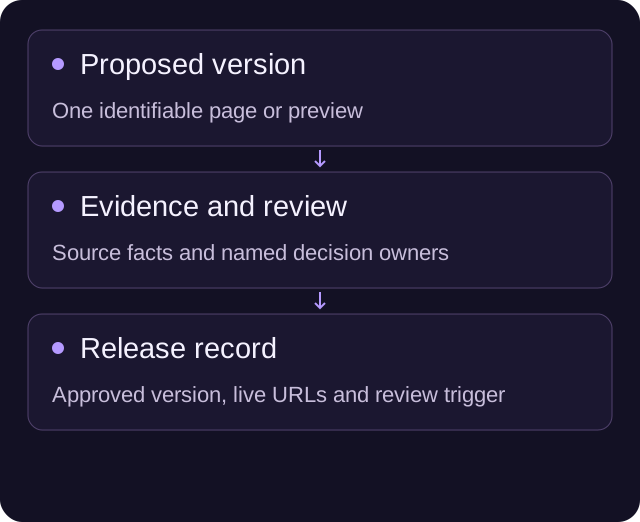
Use the same record from request to release. It should answer the following questions without searching through a long message thread:
| Field | What to record |
|---|---|
| Change ID and owner | A reference and the person responsible for completing it |
| Affected pages | Every URL or shared component included in the change |
| Proposed version | A fixed review copy or clearly identified preview |
| Evidence | Links to current product facts, fees and approved supporting material |
| Approval | Reviewer, decision, version and date |
| Release | Publisher, time, live URLs and any remaining work |
| Next review | A date or event that should trigger another check |
Keep personal customer information out of this record unless your internal process specifically requires it and provides appropriate handling. The evidence is usually the product fact or approved material, not a customer’s account details.
Check the live release, including the surrounding pages
Approval of the draft does not establish that the live website shows it correctly. After publication, compare the live page with the approved version and check the affected shared components.
Follow the main action. A revised eligibility page can still send someone to a form with old choices. A new fee explanation can still link to an outdated document. Capture those failures in the same change record so they have an owner.
Agree what happens if an error is found. Who can take the affected material out of circulation? Who supplies the replacement? Can the website team restore an earlier presentation, and would that earlier version still contain accurate facts? Restoring old code is not always a suitable content correction.
Set review dates around the facts that change
A generic annual reminder is not enough for every type of content. Fees may change on a scheduled date; product availability may change with a launch; a customer quote may need a permission check before reuse.
Attach a review trigger to the source fact. When it changes, the owner should be able to find the affected pages. A small content register is often a useful start. You don’t need to model every sentence in the CMS to keep track of the claims that matter.
Ask your CMS partner to demonstrate the workflow using your actual access roles and current plan. Confirm who can edit, review and publish, and which steps happen outside the CMS. Do not assume a visual editor automatically enforces your approval policy.
Try the workflow on one real update
Choose an upcoming change and use this release checklist:
- Name the fact changing and link its approved source.
- Find its public pages, shared components and linked documents.
- Prepare one identifiable review version.
- Obtain the approvals your responsible specialist requires.
- Check the complete page on desktop and mobile, including its form or product handoff.
- Publish the approved scope and verify the live result.
- Record the release and the next review trigger.
That exercise will expose the missing handoffs more clearly than a diagram of an ideal process. If the website makes the work harder than it needs to be, show us the change your team is trying to publish.
A few useful answers
Who approves financial website claims?
The business must name the product, commercial and designated specialist owners who decide which requirements and approvals apply. A website agency implements the publishing workflow; it does not provide regulatory approval.
Should reviewers see the complete page?
Yes. Review a clearly identified version in context, including mobile layouts, qualifications, linked information and the next step. Material wording changes need the agreed review route again.
What belongs in an approval record?
Keep the change owner, affected pages, fixed proposed version, supporting evidence, reviewer decisions, release details and next review trigger together.