Choose one representative learning task for your EdTech demo page. Show what the learner does, what guidance they receive and how an educator supports the activity. Then explain the questions a purchaser needs answered before arranging a conversation.
That is a more useful brief than “make an interactive demo”. A tour of menus may show how the software is organised while leaving the visitor unsure what learning with it involves.
The sample does not have to explain the entire product. It needs to let someone make an informed judgement about one part of it.
Name the decision the sample should help someone make
An educator may want to know whether an activity fits a lesson. A learner may need to understand its level and format. A purchaser may need to judge how the product fits an organisation’s teaching and administration.
Pick a primary audience for the sample and write their question in plain language. For example: “Can I use this activity with learners who are meeting the subject for the first time?” is specific enough to guide the content.
Keep the other audiences in view without forcing them through the same demonstration. A short teacher note can explain setup; a separate buyer section can explain deployment and support. The Department for Education’s content-strategy guidance provides a useful planning principle: start with users’ goals and decide how content will help meet them.
Show the activity and its feedback
Use a genuine activity that your product team can stand behind. Explain what the learner is trying to do, show the relevant action and include the feedback they receive. If something is only available in a particular course or plan, say so.
Here is a fictional storyboard for a maths-learning product. It illustrates the planning method; it is not a client example or evidence of educational effectiveness.
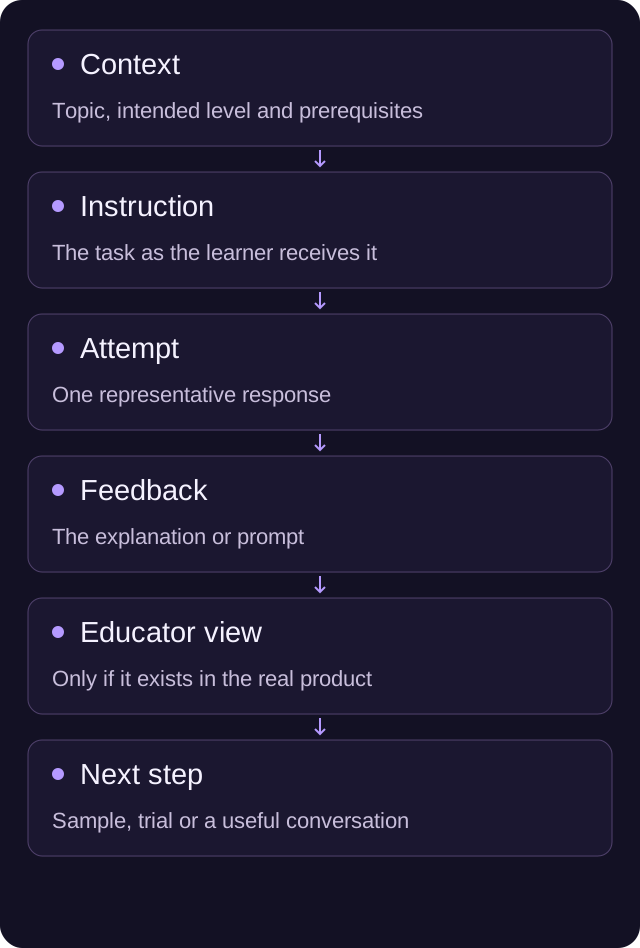
| Scene | What the visitor sees | Question it answers |
|---|---|---|
| Context | Topic, intended level and prerequisites | Is this appropriate for my learners? |
| Instruction | The task as a learner receives it | Will they understand what to do? |
| First attempt | One representative response | What does participation involve? |
| Feedback | The product’s actual explanation or prompt | How does the learner receive help? |
| Educator view | The relevant view, if it exists in the product | What can an educator see or act on? |
| Next step | Sample lesson, trial or demo request | How can I investigate the fit further? |
Do not invent feedback or an educator view for the marketing version. If the feature is still a prototype, label it accordingly and explain which parts are available now.
Keep the learning and the sales claim separate
A sample shows an activity. It does not, on its own, prove a learning outcome. Describe what someone can observe and link any broader claim to the evidence your team has approved.
“The learner gets a worked explanation after an incorrect answer” is a product description if the sample demonstrates it. “Learners progress twice as fast” is a different claim and needs appropriate evidence. Avoid filling the gap with an unattributed statistic or a success chart created for the page.
The same applies to teacher time and administration. Show the task and its steps. If you have a measured result from a permitted customer study, give its context rather than implying every team will see the same result.
Connect the sample to the rest of your website
Our EdTech website work focuses on helping people understand the learning offer and find the right next step. If your product needs a long sales call before anyone can see what it does, bring us a representative activity and the questions buyers keep asking. We can help shape the public page around them.
Choose a format your team can maintain
A recorded demonstration can explain a sequence clearly, but someone needs to update it when the interface changes. An interactive sample can let a visitor try the task, but it needs a defined reset state, usable controls and an owner. A set of annotated screens may be enough when the important point is the feedback or teaching approach.
Choose the smallest format that answers the question properly. Ask the product team how often the underlying activity changes and who can review the sample. A demonstration that quietly falls behind the product makes the sales conversation harder.
For video, plan captions and the explanation of important visual information before recording. W3C’s accessible-media guidance is useful for briefing the production work. Keep essential course facts and the next step available outside the player too.
If you are comparing formats more broadly, our interactive product demo guide covers the choice between tours, video and live examples. This page’s job is deciding what learning to show.
Use a clean demonstration environment
Prepare fictional learner accounts and records for public demonstrations. Check names, profile images, written responses, notifications and any information visible when a menu opens. A clean starting screen does not establish that every later state is suitable for publication.
Agree with your product and privacy owners what can be shown. If a real classroom or customer example is used, permission and publication scope need checking before it enters the edit. Do not rely on hurriedly blurring details at the end.
An interactive example also needs a safe boundary. Establish what a visitor can change, whether anything is saved and how the sample returns to its starting state. It should not create real learner activity or submit enquiries without making that action clear.
Give the visitor a matching next step
After a sample aimed at teachers, offer a relevant trial or a conversation about classroom use. A school-wide purchase may need information about implementation, training and support. A learner looking for a course may need dates, format and price.
Label the action accurately. “Try a lesson” should lead to a lesson or explain any account requirement before the visitor starts. “Book a demo” should make clear that it requests a conversation rather than opens the product immediately.
Check the confirmation as part of the page. If the visitor requests a demonstration, explain who will reply and what happens next using your actual follow-up arrangement. Don’t invent a response-time promise to make the form feel complete.
Take this storyboard into the next review
Write down the following before commissioning the page:
- Audience and decision: who is watching, and what should they be able to judge?
- Activity: which real task represents the learning offer?
- Feedback: what does the learner receive, and what can the educator see?
- Evidence: which statements are product facts and which need separate support?
- Format and access: can people understand the sample with different ways of using the page?
- Data: which fictional accounts and content will be used?
- Ownership: who checks the sample against the current product?
- Next step: what should someone do after deciding the sample is relevant?
Try the draft with someone outside the product team. Ask what they think the learning involves and what they would do next. Their answer will show which context is still missing. If you want help turning that material into a useful page, tell us about the product and the sample you have.
A few useful answers
What should an EdTech demo show?
Choose a representative learning task, its instructions, the learner’s action and the feedback they receive. Give educators and buyers enough context to judge whether it fits their needs.
Does a sample demonstrate learning effectiveness?
Not by itself. A sample shows an activity. Broader claims about outcomes or time saved need appropriate approved evidence and context.
Can we use real learner records in the sample?
Prepare a clean demonstration environment with fictional records. If real people or customer examples are included, the responsible owners must check permission and publication scope first.