
An interactive product demo is a guided view of a product task that visitors can explore before committing to a sales call or a live account. It works best when it shows one useful outcome, uses safe example data and provides a clear next step. It should help a buyer understand the product rather than becoming another obstacle to using the website.
The difficult part is choosing what to show. A tour of every menu can leave someone with more interface knowledge and less understanding of why the product matters. Start with the question that a good sales demonstration would answer first.
When is an interactive demo worth making?
Use a demo when the product’s value becomes clearer through a short sequence: creating a request, reviewing an exception, comparing an option or publishing a result. If the task can be explained by one image and a sentence, that simpler format may be enough.
Ask sales and onboarding teams which misunderstandings recur. Choose a demonstration that resolves a specific one. For example, a workflow product might need to show how an incoming request reaches the right reviewer, rather than how many settings the platform contains.
Consider whether the team can keep the demo current. A tour is another product-facing asset with an owner, release dependencies and an expiry risk. A simple video that stays accurate can be more useful than an elaborate interactive experience that quietly stops matching the product.
Guided tour, video or live sandbox?
A guided screenshot tour gives visitors a controlled path through a task. A video gives the team control over pacing and narration. A live sandbox allows broader exploration, but needs careful thought about data, resets, permissions and product behaviour.
| Format | Useful when | What the team must maintain |
|---|---|---|
| Guided screenshot tour | A short sequence explains the main workflow | Captures, annotations, links and accessibility alternatives |
| Short video | Timing or narration matters | Recording, captions, transcript and a useful poster |
| Interactive concept | The intended interaction needs explaining before a product exists | Clear concept labelling and boundaries |
| Live sandbox | Buyers need realistic exploration | Safe data, access, resets, availability and support |
Do not choose a sandbox merely because it sounds more sophisticated. If the product requires substantial configuration before anything makes sense, a controlled demonstration may respect the visitor’s time better.
Storyboard one customer job
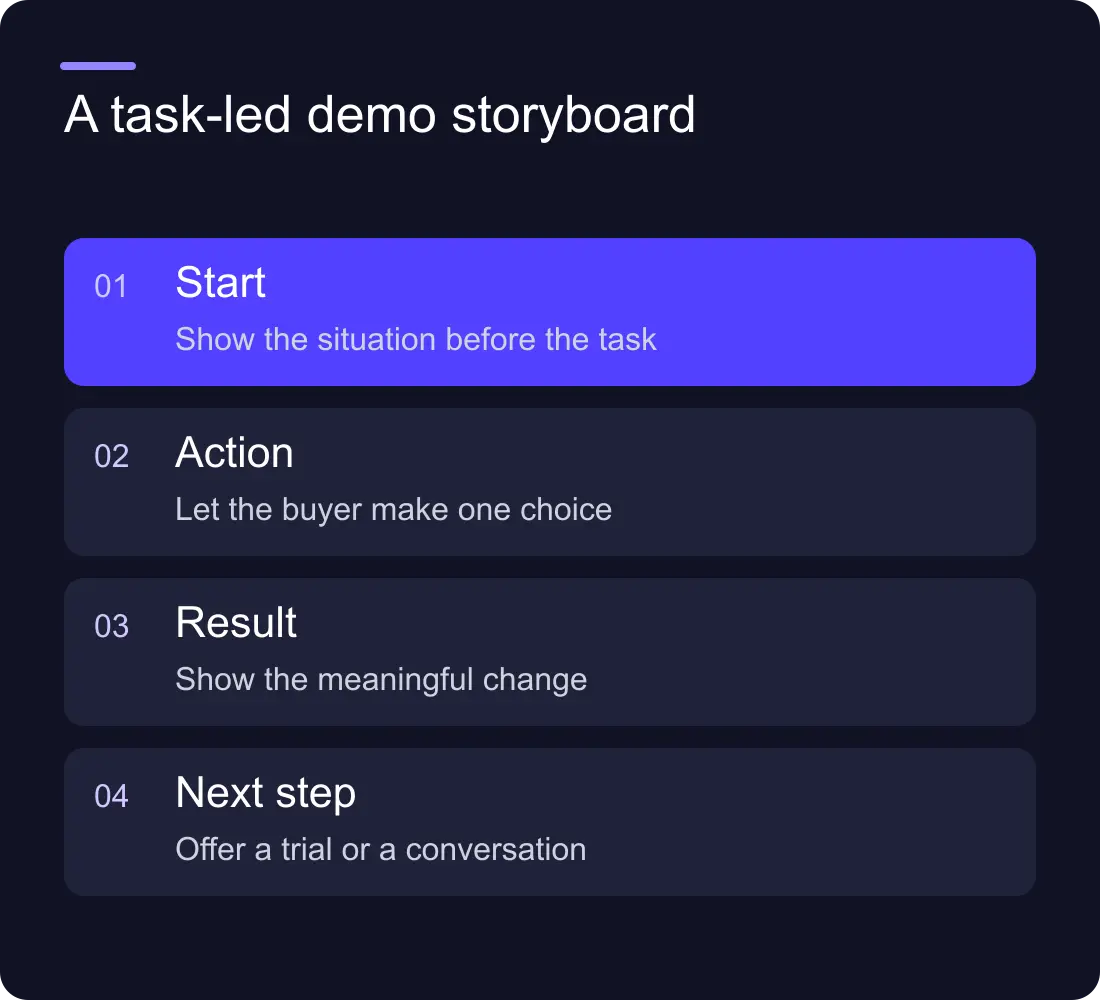
Write a storyboard before selecting a tour platform. Each scene needs a starting situation, an action and a visible result. Keep only the steps required to understand the chosen job.
Here is a fictional storyboard for a document-review tool. An incoming draft appears with an owner. The visitor selects the review action. A relevant comment appears beside the passage. The document then moves to an approved state, with the next owner visible. These scenes explain a handover without claiming any measured time saving.
Use short annotations that explain the decision, not the interface label the visitor can already see. “Send the draft to the named reviewer” is more useful than “Click the blue button”. Allow people to move back, restart and leave the tour.
Which data should the demo contain?
Use fictional or appropriately approved demonstration data. Remove confidential records, personal details, credentials and internal browser tabs from captures. Check the entire frame, including notifications and account menus, rather than only the main panel.
Label the demo as an example when it is not a customer case. If a chart appears, either use verified attributable figures or explain that the values are illustrative. Do not allow a polished mock dashboard to imply measured product results.
Keep the example coherent. Names, statuses and dates should agree across scenes. A request that changes owner without an explanation makes the workflow look arbitrary, even if every individual screenshot is attractive.
Embed it without making the page depend on it
The page should explain the product in ordinary text before the visitor opens the demo. Include a concise task summary and an accessible alternative such as a sequence of images with captions or a transcript. Give an iframe a meaningful title and check the controls with a keyboard.
Reserve space for the embed so the page does not jump when it loads. Load the heavier experience when it is needed rather than requiring it for the first screen. Review the third-party provider’s current data and loading behaviour for your implementation.
Test the fallback deliberately. Block or disconnect the embed in a test environment and check whether the visitor can still understand the offer and continue to the next step. An unavailable demo should not leave an empty rectangle with no explanation.
Where should the demo sit in the buying journey?
Put it beside the product explanation it supports. A homepage may use a compact preview with a route to the full demonstration. A use-case page can show the relevant task directly. A pricing page might link to the demo for the capability that distinguishes a plan.
Explain what visitors will see before they launch it. Avoid calling a screenshot tour a free trial. A trial implies access to a usable product account; the expectations and operating responsibilities are different.
Be deliberate about gating. Asking for contact details before someone sees any useful product material can work against the purpose of a demo. If you request details, explain what happens to the request and whether a follow-up conversation is part of the offer.
Measure comprehension and useful progression
Track the demo’s opening, meaningful progress and completion only where your measurement setup supports those events. More importantly, examine the next step and whether subsequent enquiries understand the product better.
Do not treat every scene click as a separate lead. A person exploring the controls may generate many events without becoming more interested. Define the question each metric answers before reporting it.
Ask a small review group to explain the demonstrated job in their own words. Their feedback can uncover confusion, but it is qualitative evidence rather than a conversion benchmark. When comparing versions, record the audience, release date and other page changes.
A release checklist for the demo
- The opening names the customer task and the demonstration’s limits.
- Example data is safe, consistent and clearly labelled.
- Controls work with keyboard input and on a small screen.
- Captions or an equivalent text explanation are available.
- The page stays useful when the embedded experience fails.
- The next action accurately describes a trial, call or further explanation.
- A named owner reviews the demo when the relevant product workflow changes.
Use the SaaS homepage messaging guide to connect the tour to a clear opening, and the SaaS pricing page guide to explain the conditions behind the offer.
Frequently asked questions
Is an interactive product demo the same as a free trial?
No. A demo usually illustrates selected product behaviour. A free trial gives access to a usable product under stated conditions. Describe the destination accurately so visitors know what they will receive.
How many steps should a product tour have?
Use the fewest steps needed to explain one complete customer job. The right length depends on the task. Remove scenes that only show navigation or repeat a point the visitor already understands.
Can we publish a demo before the product is built?
You can publish a clearly labelled concept to explain an intended experience. Do not imply that conceptual screens demonstrate available capabilities, a working integration or measured customer results.
Should every website visitor be forced through the demo?
No. Keep the product explanation and next actions available outside it. Visitors may already know the product, use assistive technology or be unable to load the interactive experience.
See Hilvy’s product and app work, or discuss a website demonstration.











































