An education website content audit should leave you with decisions, not just a spreadsheet of URLs. For each important page or document, establish who needs it, whether it is current, who owns it and what should happen next.
That gives a redesign or CMS project something useful to work from. It also exposes problems that a new layout cannot fix: conflicting dates, an admissions document nobody owns or a programme page missing the information an applicant needs.
Start with a manageable set of high-value tasks. You can extend the register once the team has agreed how to make decisions.
Choose tasks before scoring pages
Ask admissions, teaching, administration and communications colleagues which questions keep coming back. Then choose the pages people need to complete those tasks.
For a school, that might include finding admissions information, term dates, fees where relevant and the right contact. For a college or programme provider, it may include checking entry requirements, comparing courses and understanding how to apply.
Keep prospective and current audiences distinct. A person deciding whether to apply has a different task from someone looking for a timetable. A single navigation item labelled “Information” may conceal both.
The Department for Education’s content-strategy guidance recommends planning around users’ goals, agreeing ownership and reviewing content over time. Use that as a working principle rather than treating every existing page as equally important.
Build a register that someone can maintain
Record HTML pages and documents. A current page can still link to an old prospectus, policy or application form. Include the destination of an important link, not only the text of the page containing it.
Keep the first version of the register short enough to use:
| Field | What to record |
|---|---|
| Address and title | The live page or document URL |
| Audience and task | Who needs it and what it helps them do |
| Source owner | Who can confirm that the facts are right |
| Status | Current, uncertain, superseded or awaiting a decision |
| Evidence | Relevant enquiries, user feedback or available analytics |
| Next action | Keep, edit, combine, archive or investigate |
| Review trigger | A date, term change, policy update or other event |
Do not remove a page just because traffic is low. A safeguarding contact, specialist support page or required policy can be important without attracting many visits. Consider its purpose and the institution’s obligations alongside usage.
Separate required information from editorial choice
Have the responsible institutional owner identify what must be published and which guidance applies. Requirements differ by institution and jurisdiction. Do not use one generic “school compliance checklist” as authority for every education website.
In England, the Department for Education publishes separate guidance for maintained schools and academies and further education colleges. Link the applicable guidance in the internal register and record who checks it. These links are not a statement that every institution follows either category.
Keep the publishing decision separate from the page design. A required document still needs a meaningful title, a clear route to it and an owner who can replace it when it changes.
Make routine updates possible for the people doing them
For Beechwood Nursery’s website, our work included a CMS setup that staff and administrators could use to manage the site. That is the kind of publishing requirement to identify during an audit. Our education website service covers institution and programme websites; bring the pages your team finds difficult to keep current.
Check a whole programme or admissions journey
Follow one real route from the search result or landing page to the next step. Read the page as someone unfamiliar with the institution.
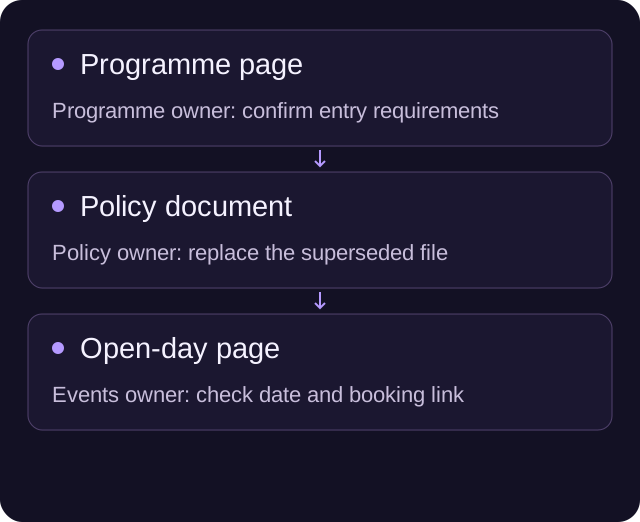
For a programme, check the audience, subject, level, entry requirements, format, location and dates where relevant. Then follow the application or enquiry link. Does the destination refer to the same programme? If applications are closed, is there a useful next step?
For a school, check the information a parent needs before making contact and the route they should use. Avoid copying the whole admissions process into several pages if the underlying dates or rules change in one place.
Record the exact missing fact or broken handoff. “Improve the course page” is difficult to assign. “The application link opens last year’s form” gives someone a problem they can resolve.
Decide how documents will stay usable
For every important download, establish whether it needs to remain a document. Information that people read online may be easier to maintain as a web page. A form that must be downloaded needs a clear format, version and alternative route if someone cannot use it.
The government’s accessible-document guidance recommends HTML wherever possible and explains the challenges of other formats. Use it to inform the publishing discussion; converting a PDF does not by itself establish that the resulting page is accessible.
Keep a document’s source file and owner in the register. Otherwise, the next update may begin with someone trying to edit the published PDF. Check links to the document from other pages before replacing or retiring it.
Turn the audit into an editing backlog
Group the work by the problem it solves. A sensible first pass might be:
- Immediate corrections: wrong dates, contact routes, unavailable programmes and broken application links.
- Decision content: missing information needed to compare, apply or ask a useful question.
- Publishing structure: repeated facts, unclear content ownership and page types without a reusable template.
- Archive decisions: superseded content, with retention and URL handling agreed by the right owner.
Give each item a named owner and acceptance check. An admissions page can be accepted when the responsible person confirms the facts and the team has followed the next step successfully. A CMS task can be accepted when the intended editor makes the real update.
Keep the original URL in the record. An editorial decision to combine or archive content still needs a separate decision about links, search value and any redirect. If a move is planned, use our website migration planner to carry those URL decisions forward.
Take one small register into the redesign brief
Choose an audience journey, list its pages and documents, and answer four questions for each: is it right, is it useful, who owns it and what changes next?
That first register is a practical resource for the next meeting. It shows the designer what needs explaining, the developer what must repeat and the editor what they will maintain after launch.
If the content keeps getting out of step with the institution, show us one journey and the people who update it. We can discuss the website structure around that work.
A few useful answers
What should an education content audit produce?
A usable register of important pages and documents, their audience, factual owner, status, next action and review trigger, followed by an editing backlog with named owners.
Should a low-traffic page be deleted?
Not on traffic alone. A required policy, safeguarding contact or specialist support page may be important despite low usage. The institutional owner must consider purpose and obligations.
Does one publication checklist apply to every institution?
No. Requirements differ by institution and jurisdiction. The responsible owner should identify the applicable guidance rather than rely on a universal school checklist.