An education website migration needs to preserve the tasks people rely on: finding a programme, checking information, making an enquiry and reaching the right application or existing student system. Moving the page content is only part of that work.
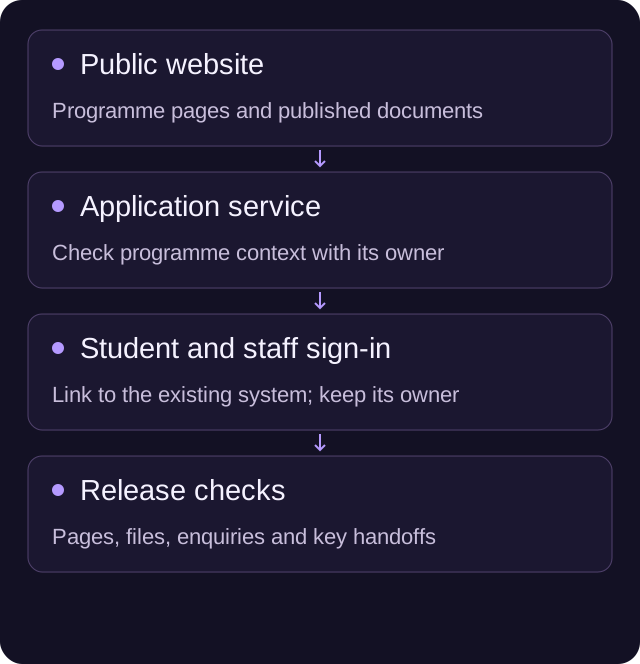
Start by defining what is moving. A public website, a learning platform and a student information system are separate systems even when people reach them through the same navigation. Name the owner of each connection and agree which changes the release includes.
Use the checklist below to prepare the move and decide whether the new site is ready. It is a release-planning aid, not a guarantee about search rankings or statutory compliance.
Choose the release window around actual deadlines
Look at admissions dates, open days, enrolment activity and the team’s publishing calendar before setting a launch date. Ask who will be available to verify the live site and handle corrections.
That does not mean every institution has a quiet period. It means the launch plan should recognise when a broken application link or missing document would be particularly disruptive.
Write down how late content changes will be handled. If admissions updates an entry requirement while a page is being migrated, who carries it across? A content freeze needs an exception route for information that cannot wait.
Inventory pages, files and the links into other systems
Combine the current sitemap with a crawl, available Search Console data and the institution’s own knowledge of important content. Include PDFs, prospectuses, forms, policy documents and links shared in emails or printed material.
For each item, decide whether it stays at the same address, moves, combines with something else or needs an archive decision. Preserve useful existing URLs where practical. A new CMS does not require every address to change.
Google’s site-move guidance covers URL mapping, redirects and monitoring. It also warns that search visibility can fluctuate during a move. Keep that uncertainty visible in the plan rather than accepting a promise of a risk-free migration.
Our website migration planner is a useful place to organise those URL decisions. If nobody can confirm whether a document is current, resolve that ownership question before treating the file as ready to migrate.
Keep public programme information distinct from learner records
A public course catalogue may need titles, descriptions, entry requirements, dates and application links. That does not mean the new marketing CMS should receive learner accounts, assessments or student records.
Ask the relevant product or IT owner to define the boundary. If a programme identifier is needed to reach an external application service, record its meaning and test it. Avoid matching programmes by similar titles when the receiving system expects a stable identifier.
For a search or filter interface, prepare a small set of representative queries. Include a programme with a long name, one with a different location and one that is no longer accepting applications. Check what people see when there are no results.
Scope the public website move with the right owners
Our education website work covers the public pages and publishing setup around an institution or programme. If you are planning a move, bring the current sitemap, the key application routes and the people responsible for those systems. We can discuss the website scope without assuming the learning platform needs replacing too.
Test the connections using representative routes
Create a test sheet that names the starting page, intended destination, expected outcome and receiving-system owner. Use authorised test data and a suitable test environment for anything that submits an application or creates a record.
| Route | Before release | On the live site |
|---|---|---|
| Programme to application | Confirm the right programme and destination | Follow the link and check its context |
| General enquiry | Test fields, routing and confirmation | Run an agreed labelled test with the receiving team |
| Prospectus or policy download | Verify the current file and usable link text | Check the live file and the pages linking to it |
| Student or staff sign-in | Confirm the intended system owner and URL | Verify the navigation reaches the real sign-in route |
| Event or open day | Check date, availability and booking connection | Confirm the current event and working next step |
| Search and filters | Test representative content and empty states | Repeat the key queries against published content |
Do not submit a real application just to prove a marketing link works. Agree the extent of each test with the owner who can see the resulting record and clean it up appropriately.
Let the publishing team try the new CMS
Ask an intended editor to make a real type of change: update a date, replace a document or publish an event. Use a draft or staging environment and watch where they need help.
The exercise tests the content model as much as the training. If an editor must change the same fact in several unrelated fields, the migration may be carrying an old maintenance problem into the new system.
Agree roles, review responsibilities and supplier-account ownership. Keep the original document sources and any integration instructions with the handover. A recording is useful, but someone still needs to own changes when a colleague leaves.
Make the launch decision from evidence
Use a release record rather than a verbal “looks fine”. At minimum, record the following:
- Content: the named owner has approved current programme and institutional information.
- URLs: important existing addresses are preserved or have a tested, relevant destination.
- Documents: current files, meaningful links and document owners are recorded.
- Journeys: application, enquiry, booking and sign-in routes have passed the agreed tests.
- Access: headings, keyboard routes, forms, media and narrow layouts have been reviewed within the agreed accessibility scope.
- Search setup: titles, canonicals, indexing controls and sitemaps reflect the intended public site.
- Ownership: release authority, correction cover and supplier access are clear.
Keep unresolved issues visible with a decision owner. A cosmetic issue and a broken application route should not disappear into the same unprioritised list.
Monitor the pages people depend on
After launch, check the agreed enquiry and application routes with their owners. Review broken links, important old URLs and available Search Console information. Keep a record of corrections rather than assuming one successful homepage check proves the whole site is sound.
Content can change independently of a deployment. Establish how a publishing error will be corrected as well as how the technical release can be reversed. Returning to an earlier build may not restore a replaced document or a changed external application system.
For more detail on the search work, see our website redesign SEO guide. If you need help planning the public website release, send us the current site and your next important deadline.
A few useful answers
Does moving the public website also mean moving student systems?
No. Define the public website, learning platform, application service and student-information boundaries separately, with an owner for each connection.
Do all URLs need to change when the CMS changes?
No. Preserve useful addresses where practical and map every necessary change to a relevant destination. Test redirects and monitor the move without promising unchanged rankings.
How should application routes be tested?
Use representative journeys and authorised test arrangements agreed with the receiving-system owner. Do not submit a real application merely to prove a marketing link works.