

A blog organises an ongoing stream of articles. A resource hub organises material around the questions and tasks buyers need to complete. Use a resource hub when your audience needs to navigate several formats or find information by problem, role or stage. Keep a blog when a chronological article stream is sufficient.
The two can coexist. The useful change is giving visitors a route through the content, rather than replacing the word Blog with Resources above the same list of cards.
Diagnose the problem before changing the label
Look at how someone finds a useful answer today. Can a buyer researching a migration locate the checklist, a relevant case study and the service explanation without opening ten unrelated articles? Can an existing customer distinguish a support guide from a sales article?
If the answer is yes, your current structure may already work. If the answer is no, a new category label will not solve it on its own. You need clearer relationships and page purposes.
A resource hub is particularly useful when content formats have different jobs. An article explains a decision. A checklist supports execution. A case study offers evidence. A webinar covers a topic in depth. Mixing those formats without labels makes the visitor do the classification work.
Organise around buyer jobs
Begin with a handful of genuine tasks. For a B2B website, these might be planning a redesign, choosing a publishing platform, improving lead routing and assessing website performance. Use wording that makes sense outside your company.
Avoid a taxonomy based only on internal departments. Visitors rarely arrive thinking they need the Thought Leadership division. They arrive with a question, a problem or a decision.
Each task page should introduce the subject and curate a sensible starting point. Do not fill it automatically with everything carrying a broad tag. Curation gives the page a reason to exist beyond duplicating the archive.
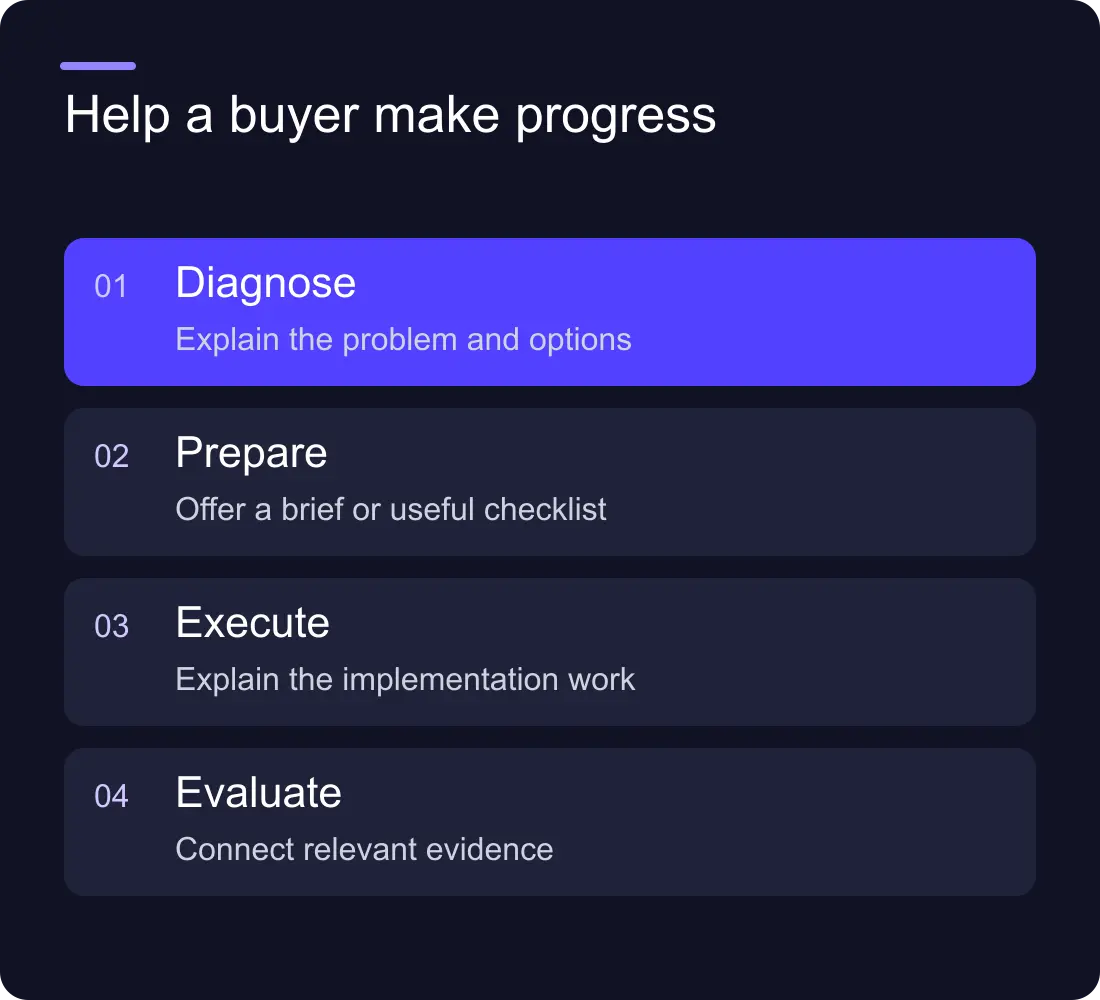
A worked example: the redesign collection
Imagine a fictional software business with twenty website articles. A visitor considering a redesign needs four kinds of help:
| Visitor question | Useful resource | Next step |
|---|---|---|
| Do we need a redesign? | Diagnostic article | Identify the actual problem |
| What should we ask an agency? | Brief template | Prepare requirements |
| What can go wrong during launch? | Migration checklist | Protect URLs and tracking |
| Has this approach worked elsewhere? | Relevant case study | Examine real evidence |
The collection page can explain that sequence in a few sentences. It does not need to force every visitor through it. Someone with an approved brief should still be able to jump straight to the migration checklist.
The diagram in this article illustrates that progression, rather than suggesting the fictional business achieved a particular conversion result.
Keep formats distinct in the CMS
Give each format the fields it needs. An event may need a date and registration destination. A guide may need a file or a readable online version. A case study needs context and evidence. An article needs an authored explanation.
Share topics and authors where they are genuinely reusable. Keep the public cards consistent enough to compare, but label the format and make the destination clear. A card should not look like an article if it immediately opens an external signup page.
If your publishing team keeps duplicating information, review the CMS content model before building more filters. Better navigation depends on consistent source information.
Give every collection page an editorial purpose
A topic landing page should answer three quick questions: what does this collection cover, who is it useful for and where should I start? Add a short introduction and a carefully selected first resource.
Then group the rest in a way that matches the topic. A redesign collection might separate planning, implementation and post-launch checks. A tooling collection might separate choosing a tool from using it. You do not need an identical navigation system for every subject.
Do not generate hundreds of thin combinations just because a filter can produce them. A useful indexable page needs its own purpose and content. Decide deliberately which topic URLs should be discoverable in search and which controls simply help browse the existing list.
Search and filters solve different problems
Search helps visitors who know a word or phrase. Filters help visitors narrow a set of options using familiar categories. A useful hub may need both, but a small library may need neither beyond a clear topic menu.
Start with the simplest route that supports real tasks. Too many filter choices can turn a modest library into a complicated interface. Test the empty state, reset control and mobile layout before adding more categories.
Our site search versus CMS filters guide covers the implementation decision. Keep the broader information architecture separate from the choice of widget.
Measure whether people find useful material
Page views alone cannot tell you whether the hub works. Look at collection-to-resource journeys, internal search terms, empty results and the next meaningful action. For commercial content, connect those journeys to qualified enquiries where your measurement setup allows it.
Keep the analysis honest. A resource may help an early decision without being the last page before a conversion. Ask sales which resources they use in real conversations, and compare that with the observable website journeys.
Review the library regularly. Retire outdated resources, fix broken destinations and update collection introductions when the subject changes. A resource hub is an editorial responsibility, not a one-off design component.
Frequently asked questions
What is the difference between a resource hub and a blog?
A blog usually presents articles as an ongoing stream. A resource hub groups useful material around audience tasks and can include several formats. The distinction is the navigation and editorial purpose, not the name of the page.
Should a small business replace its blog with a resource hub?
Only when visitors need a better way to navigate the material. A small, focused article library may work well with a simple blog and a few clear topics. Add complexity when it solves a real finding problem.
Should every resource be behind a form?
No. Decide whether gating serves the resource and the visitor. An answer needed to evaluate your expertise often benefits from being openly readable. If a form is used, explain what the visitor receives and what happens after submission.
Can a resource hub help SEO and answer engines?
Clear, accessible resources and meaningful internal links can help discovery and understanding. Each page still needs a useful purpose and accurate content. A hub structure does not guarantee rankings or citations in AI answers.











































