
Back to Insights

Selling courses on Webflow

Selling Courses on Webflow: A Comprehensive Guide

Understanding Webflow

Webflow Vs Wordpress

Webflow is a website builder that allows users to create responsive websites without having to write any code. It is a cloud-based platform that offers a drag-and-drop interface, which makes it easy for users to design and build websites. On the other hand, WordPress is a content management system (CMS) that is used for creating blogs and websites. While WordPress is more popular, Webflow has its own advantages.

One of the main advantages of Webflow over WordPress is that it is a fully hosted platform. This means that users do not have to worry about hosting their websites, as Webflow takes care of that. Additionally, Webflow allows users to design and develop websites visually, which makes it easier for non-technical users to create websites.

Another advantage of Webflow is that it is a responsive website builder. This means that the websites created using Webflow are optimized for all devices, including desktops, tablets, and smartphones. On the other hand, WordPress requires users to install responsive themes or plugins to make their websites mobile-friendly.

Webflow Vs Other Site Builders

There are many website builders available in the market, and Webflow is one of them. However, Webflow has some advantages over other site builders.

One of the main advantages of Webflow over other site builders is that it offers a more advanced design interface. This means that users can create more complex and visually appealing websites using Webflow. Additionally, Webflow offers more customization options than other site builders, which means that users can create websites that are more unique.

Another advantage of Webflow is that it is a more powerful website builder than other site builders. This means that users can create more complex websites using Webflow. Additionally, Webflow offers more advanced features than other site builders, such as the ability to create dynamic content and animations.

In conclusion, Webflow is a powerful website builder that offers many advantages over other site builders. It is a fully hosted platform that allows users to create responsive websites without having to write any code. Additionally, Webflow offers a more advanced design interface and more customization options than other site builders.

Getting Started with Webflow

Setting Up Your Webflow Account

To begin selling courses on Webflow, the first step is to set up a Webflow account. This can be done by visiting the Webflow website and creating an account. Once the account is created, users have access to a wide range of features that can be used to create and launch their courses.

Navigating the Webflow Interface

Webflow provides users with a user-friendly interface that makes it easy to create and launch courses. The interface is divided into several sections, including the dashboard, designer, and editor. The dashboard provides users with an overview of their account, while the designer allows users to create and customize their courses. The editor is used to publish and launch courses.

Beginners may find the interface a bit overwhelming at first, but with a little practice, it becomes easier to navigate. Webflow also provides users with a range of resources, including tutorials and guides, to help them get started.

Creating Your Course

Once the account is set up and the interface is familiar, users can begin creating their courses. Webflow provides users with a range of tools that can be used to create engaging and interactive courses, including animations, interactions, and CMS features.

Users can create their course from scratch or use one of the many templates provided by Webflow. Templates can be customized to meet the user's specific needs, making it easy to create a course that is unique and engaging.

Going Live with Your Course

Once the course is created, it is time to launch it. Webflow provides users with a range of options for launching their courses, including hosting the course on the Webflow platform or exporting the course to another platform.

Users can also use Webflow's CMS features to manage their course content and keep it up-to-date. This makes it easy to make changes to the course content and keep it relevant and engaging for learners.

Conclusion

Webflow is a powerful platform that provides users with a range of tools and features for creating and launching courses. With a little practice, users can create engaging and interactive courses that are sure to capture the attention of learners.

Designing in Webflow

Webflow is a popular no-code website builder that allows users to design custom websites without the need for coding knowledge. With Webflow, designers can create stunning websites with ease, whether they are professional designers or beginners.

One of the benefits of Webflow is that it is template-based, which means that users can choose from a wide range of templates to get started. These templates are designed by professional designers, so users can be sure that their website will look great.

Webflow also offers a powerful CSS grid system, which allows users to create complex layouts with ease. The grid system is based on columns and rows, and users can easily edit the grid to create the perfect layout for their website.

Overall, designing in Webflow is a straightforward and intuitive process. Whether users are experienced designers or beginners, they will find that Webflow offers a wide range of tools and features to help them create the perfect website.

Creating Courses on Webflow

Webflow is a popular website builder that allows users to create and sell online courses. With Webflow, creating a course is a straightforward process that involves structuring the course, adding course content, and creating course categories.

Structuring Your Course

Before adding content to your course, it's essential to structure it in a logical and easy-to-follow format. Begin by outlining the course objectives and creating a curriculum that aligns with those objectives. The curriculum should include all the lessons, topics, and assessments that students will encounter throughout the course.

Next, divide the curriculum into modules and create a clear hierarchy that outlines the relationship between each module and the lessons within it. This structure will help students navigate the course and stay on track.

Adding Course Content

Once you've structured your course, it's time to add content. Webflow offers a simple drag-and-drop interface that makes it easy to add text, images, videos, and other multimedia elements to your course.

When adding content, it's important to keep the course objectives in mind and ensure that each lesson aligns with those objectives. Additionally, be sure to include assessments and quizzes throughout the course to help students reinforce their learning.

Creating Course Categories

To make it easier for students to find and enroll in your courses, it's essential to create course categories. Course categories are groups of related courses that help students navigate your course catalog.

When creating course categories, consider the different topics and themes that your courses cover. For example, if you offer courses on web design, you might create categories for UI/UX design, front-end development, and graphic design.

Overall, creating courses on Webflow is a straightforward process that involves structuring your course, adding content, and creating course categories. By following these steps and keeping your course objectives in mind, you can create engaging and effective online courses that help students achieve their learning goals.

Selling Courses on Webflow

Selling courses on Webflow is a great way to monetize your skills and knowledge. Webflow is a powerful platform that allows you to design and host your own website, and with the right tools, you can easily sell your courses to students around the world. In this section, we'll explore the steps you need to take to set up your sales page and market your courses effectively.

Setting Up Your Sales Page

The first step to selling courses on Webflow is to create a sales page that will attract potential students and convince them to enroll in your course. Here are some tips to help you create an effective sales page:

  • Use a clear and attention-grabbing headline that highlights the benefits of your course.
  • Include a detailed description of your course, including the topics covered, the level of difficulty, and any prerequisites.
  • Use high-quality images and videos to showcase your course and give potential students a taste of what they can expect.
  • Include social proof, such as testimonials from satisfied students, to build confidence in your course.
  • Use a clear and prominent call-to-action (CTA) button to encourage visitors to enroll in your course.

Once you've created your sales page, you'll need to integrate it with a payment processor to handle transactions. Webflow supports several payment processors, including Stripe and PayPal, which allow you to securely process payments and manage subscriptions.

Marketing Your Courses

Once you've set up your sales page, the next step is to market your courses effectively to attract potential students. Here are some tips to help you market your courses effectively:

  • Use social media to promote your courses and engage with potential students. Share links to your sales page, post updates about your course, and respond to questions and comments from followers.
  • Offer free content, such as blog posts or videos, that showcase your expertise and give potential students a taste of what they can expect from your course.
  • Partner with other businesses or influencers in your niche to reach a wider audience and build credibility.
  • Use email marketing to stay in touch with potential students and promote your courses. Offer exclusive discounts or early access to new courses to incentivize sign-ups.
  • Consider running paid advertising campaigns, such as Google Ads or Facebook Ads, to reach a wider audience and drive traffic to your sales page.

By following these tips, you can effectively market and sell your courses on Webflow, reaching a wider audience and monetizing your skills and knowledge.

Integrating with Other Platforms

Webflow offers various integrations with other platforms, making it easy to connect with different tools and services. This section covers some of the most popular integrations for selling courses on Webflow.

Integration with Teachable

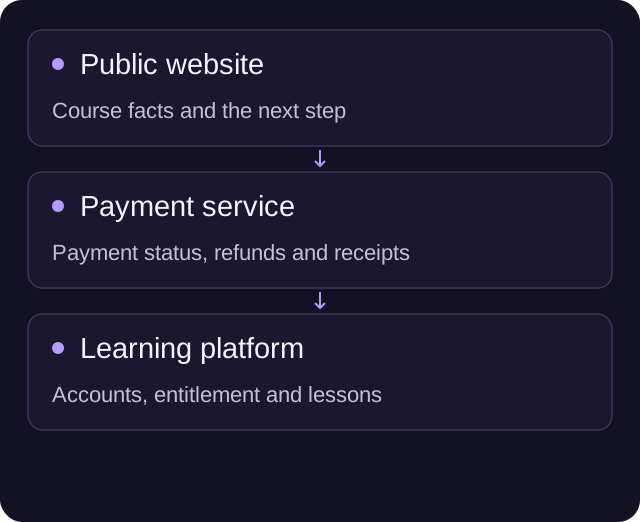
Teachable is a popular platform for creating and selling online courses. Integrating Teachable with Webflow allows you to create a seamless experience for your students. You can use Teachable to manage your course content and payments, while using Webflow to design and host your course website.

To integrate Teachable with Webflow, you can use the Teachable Webhooks plugin. This plugin allows you to trigger actions in Teachable based on events in Webflow, such as when a new user signs up or when a payment is made. You can also use Zapier to connect Teachable and Webflow, allowing you to automate tasks between the two platforms.

Integration with Kajabi

Kajabi is another popular platform for creating and selling online courses. Integrating Kajabi with Webflow allows you to use Kajabi's powerful course creation tools, while still using Webflow to design and host your course website.

To integrate Kajabi with Webflow, you can use the Kajabi Webhooks plugin. This plugin allows you to trigger actions in Kajabi based on events in Webflow, such as when a new user signs up or when a payment is made. You can also use Zapier to connect Kajabi and Webflow, allowing you to automate tasks between the two platforms.

Using Zapier with Webflow

Zapier is a powerful tool that allows you to connect different apps and automate tasks between them. You can use Zapier to connect Webflow with other platforms, such as Teachable and Kajabi, as well as with other tools and services.

To use Zapier with Webflow, you can create a Zap that connects Webflow with another platform or tool. For example, you can create a Zap that adds new Webflow form submissions to a Google Sheets spreadsheet, or a Zap that sends new Webflow blog posts to your social media accounts.

Overall, integrating Webflow with other platforms can help you create a seamless experience for your students and automate tasks between different tools and services. Whether you choose to use Teachable, Kajabi, Zapier, or other plugins, Webflow offers a range of options for selling courses online.

Optimizing Your Webflow Site

When it comes to selling courses on Webflow, optimizing your site is crucial to attract potential customers. Here are some tips to optimize your Webflow site for better performance:

Understanding SEO in Webflow

Search engine optimization (SEO) is an essential part of any website, and Webflow makes it easy to optimize your site for search engines. Here are some things to keep in mind:

  • Use relevant keywords in your content and meta tags.
  • Keep your URL structure simple and descriptive.
  • Use header tags (H1, H2, H3) to organize your content.
  • Optimize your images by using descriptive file names and alt tags.
  • Use internal linking to connect your pages and improve navigation.

Using Open Graph in Webflow

Open Graph is a protocol that allows you to control how your website appears when shared on social media. Here are some tips to optimize your Open Graph settings:

  • Use high-quality images that are at least 1200 x 630 pixels.
  • Use descriptive titles and descriptions that accurately represent your content.
  • Include relevant keywords in your titles and descriptions.
  • Use the correct image aspect ratio to avoid cropping.
  • Test your Open Graph settings using Facebook's Sharing Debugger.

By optimizing your Webflow site for SEO and Open Graph, you can increase clicks and improve your landing pages. Remember to keep your content relevant and engaging, and your site will be sure to attract potential customers.

Building a Community on Webflow

Building a community on Webflow is a great way to engage with clients and create a loyal following. Here are some tips on how to create a community on Webflow:

Creating a Blog on Webflow

A blog is a great way to share your knowledge and expertise with your community. With Webflow, creating a blog is easy. You can use the CMS to create blog posts and organize them into categories. You can also use the CMS to create tags, which will make it easier for your readers to find the content they are interested in.

When creating a blog post, make sure it is actionable and provides value to your readers. You can use bullet points, tables, and bold text to make your content easier to read and understand. You can also use images and videos to make your content more engaging.

Showcasing Your Portfolio

Your portfolio is a great way to showcase your work and attract new clients. With Webflow, you can create a portfolio that is both beautiful and functional. You can use the CMS to create portfolio items and organize them into categories. You can also use the CMS to add descriptions and tags to your portfolio items.

When creating a portfolio item, make sure it showcases your best work and provides value to your potential clients. You can use images and videos to make your portfolio item more engaging. You can also use bullet points and tables to highlight the key features of your work.

By creating a blog and showcasing your portfolio on Webflow, you can create a community of loyal followers who appreciate your knowledge and expertise.

Selected Work

People Connect iPRES with Saenty's
Farming Software for the Modern Farmer with Synnefa
Karin Young
Karin Young
Fund a better future, confidently with Briink
Radically Better Car Rental with UFO Drive
Secure payment solutions with FMpay
Wellbeing that Works with Unmind
Real Time Measurement with IP Cameras CurbFlow
Christian confidential counselling
Unmind
Unmind
A fine wine tasting community platform
Commercial property development website for Helsfyr Atrium
An environmental tech company reducing Co2 worldwide
Clinical trials with WithPower
DeskLodge meeting spaces
Body by Ciara's fitness subscription platform
Luxury Raffles properties from Singapore to Seychelles
Sustainability marketing technology by Provenance
NFT Marketplace app & website design
Creative Education With Glasgow School of Arts
Well-being website for Karin's therapy.
Automated e-commerce web app for AltSignals crypto and forex signals.
Web design & digital marketing agency.
The Fresh Nursery School website.
A Wildlife Vets charity providing critical veterinary support
Creative and commercial Media Foundry at Talenthouse
Provenance
Provenance
Supporting businesses & building brands
Defi, Acceleration & Growth Investment Group
Hosted desktops in the UK powering small businesses
Index Signals for Telegram
Gregg Martin is a Comedy Central actor, writer, producer & content creator
ApexBull Forex education platform for an ex-wall street professional
Precix mobility wearables
FMpay
FMpay
Flexciton smart scheduling
A review platform of curated forex and crypto providers
Renoster
Renoster
Smart homes with Novus Electrical
UFODrive
UFODrive
Eden Bloom funeral care
Precix
Precix
Landing for CasisDead, DeadCorp AGHAST6
JOOR wholesale fashion
Climate Action with Commons.earth
Mirador Local manage business profiles
Rainforest carbon projects with Renoster
UK Care Management with Log my Care
VC Finance with Tech CFO
Morena Comms, a PR company in London
Paid social with Aura Ads
People Connect iPRES with Saenty's
Farming Software for the Modern Farmer with Synnefa
Karin Young
Karin Young
Fund a better future, confidently with Briink
Radically Better Car Rental with UFO Drive
Secure payment solutions with FMpay
Wellbeing that Works with Unmind
Real Time Measurement with IP Cameras CurbFlow
Christian confidential counselling
Unmind
Unmind
A fine wine tasting community platform
Commercial property development website for Helsfyr Atrium
An environmental tech company reducing Co2 worldwide
Clinical trials with WithPower
DeskLodge meeting spaces
Body by Ciara's fitness subscription platform
Luxury Raffles properties from Singapore to Seychelles
Sustainability marketing technology by Provenance
NFT Marketplace app & website design
Creative Education With Glasgow School of Arts
Well-being website for Karin's therapy.
Automated e-commerce web app for AltSignals crypto and forex signals.
Web design & digital marketing agency.
The Fresh Nursery School website.
A Wildlife Vets charity providing critical veterinary support
Creative and commercial Media Foundry at Talenthouse
Provenance
Provenance
Supporting businesses & building brands
Defi, Acceleration & Growth Investment Group
Hosted desktops in the UK powering small businesses
Index Signals for Telegram
Gregg Martin is a Comedy Central actor, writer, producer & content creator
ApexBull Forex education platform for an ex-wall street professional
Precix mobility wearables
FMpay
FMpay
Flexciton smart scheduling
A review platform of curated forex and crypto providers
Renoster
Renoster
Smart homes with Novus Electrical
UFODrive
UFODrive
Eden Bloom funeral care
Precix
Precix
Landing for CasisDead, DeadCorp AGHAST6
JOOR wholesale fashion
Climate Action with Commons.earth
Mirador Local manage business profiles
Rainforest carbon projects with Renoster
UK Care Management with Log my Care
VC Finance with Tech CFO
Morena Comms, a PR company in London
Paid social with Aura Ads

Want this built, not just read about?

We turn insights like this one into shipped Webflow systems. Book a 15-min call — we'll scope it together.

Derrick
Abdul
Bunmi
Farwa
Joshua
Nitin
Samuel

Your project is in the right hands

A wealth of experience across a range of disciplines — from front-end development and backend engineering to QA, strategy, and beyond.

7 specialists·50+ projects·5★ rated