
Webflow redirects are easy to underestimate. The settings are only one part of the work: you also need to decide where each old address should go, preserve rules that already exist and verify the published result.
Use this guide when a page moves, a slug changes or a redesign replaces several URLs. For a larger release, start with a website redesign SEO plan so the redirect map reflects the content decisions.
Decide the destination before writing the rule
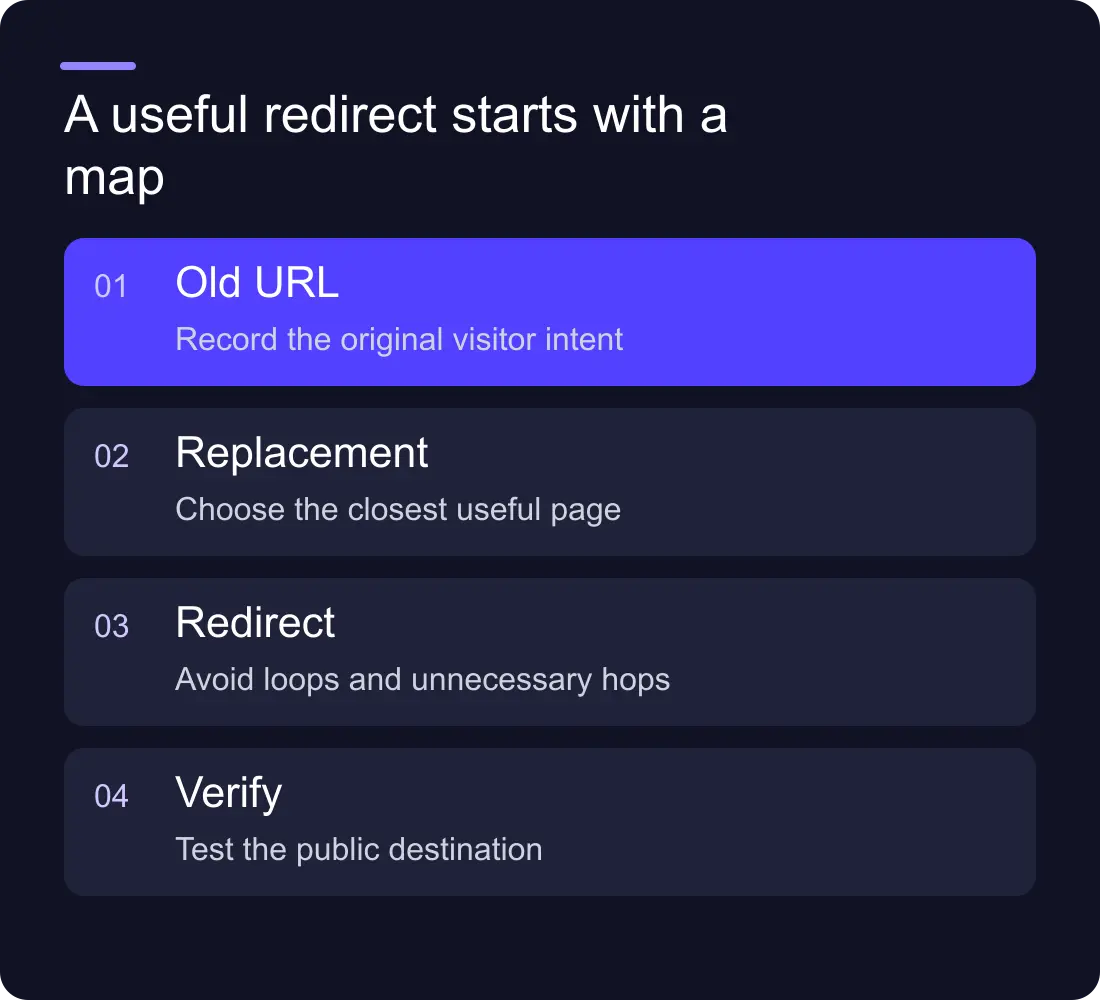
A useful redirect takes someone to the closest relevant replacement. If an old article has become a better guide, point to the new guide. If a service has moved, use the new service page. Avoid directing unrelated retired content to the homepage just to remove an error.
Sometimes a page has no relevant replacement. Record that decision instead of inventing a match. Redirects should preserve a useful journey, not disguise every missing page.
Build a worksheet with the old path, intended new path, reason, rule type and tested destination. Keep full domain names in a separate column if you are planning a domain move; path changes and domain configuration are different tasks.
Back up the existing rules
Export or otherwise record the current configuration before importing a new file. Webflow's CSV import guidance explains that importing replaces existing redirects. Your new file must include the old rules you still need as well as the new rules.
Do not assume the migration spreadsheet is the complete history. Older campaign addresses, previous redesigns and external links can depend on rules nobody has touched for years. Ask the current site owner to review the backup before removing entries.
Keep dated versions of both the backup and proposed map. The name “redirects-final-final.csv” gives the next person very little help; include the site and release date in the filename.
Prepare exact paths before wildcard rules
For a small set of moves, exact mappings are easier to review. A fictional example could map /services/old-consulting to /services/consulting and /blog/old-guide to /guides/replacement-guide.
Use Webflow's current redirect setup documentation for accepted path formats and pattern syntax. Do not copy wildcard conventions from a different host and expect them to behave the same way.
A broad pattern can accidentally catch pages that should remain available. List representative matches and exceptions before adding it. If only a few addresses need to move, an explicit map is usually simpler to inspect than a clever pattern.
Publish, then test the live domain
Test the published custom domain after applying the rules. For each old address, check the status, the first destination and the final page. A browser can hide a chain by taking you straight to the end, so use an HTTP inspection tool when the route is unclear.
Check these cases:
- A normal exact redirect.
- An old path that still has a published page.
- A representative wildcard match and an intended exception.
- A URL with an existing query string.
- A previously redirected URL from an older release.
- The destination itself, including its content and canonical.
Record the result beside the original row. “Imported successfully” describes the file operation, not the visitor's experience.
Troubleshoot the rule, the route and the cache
If a redirect appears not to work, first confirm that the site was published to the domain you are testing. Then check the old path exactly, including spelling, case and any relevant slash behaviour. Verify that an existing published page or another rule is not changing the outcome.
If the destination is wrong, trace the full chain. The first rule may be correct while a second legacy rule sends the visitor somewhere else. Point internal links directly to the final destination instead of making your own site depend on redirect chains.
Retest with a fresh HTTP request when a browser may be retaining an earlier result. Do not keep changing a valid rule simply because one browser tab shows cached behaviour.
Do redirects replace internal-link updates?
No. Update navigation, article links and other owned references to the final address. Keep redirects for people and external sources that still use the old one.
Can we delete the map after launch?
Do not remove it just because the new site has been live for a week. Existing bookmarks and external links can continue to use old paths. Keep a documented redirect policy and review specific rules with evidence.
For a larger move, see Hilvy's migration services and the Webflow SEO checklist.











































